
All account assets are uploaded into Folders in the File Vault where they are organized and prepared for distribution by Admins and Content Managers. The quickest way to share a Folder or Folder Tree with general members is to duplicate it to a Collection. This can be done with a single click in the File Vault.
Duplicate a Folder to Collections
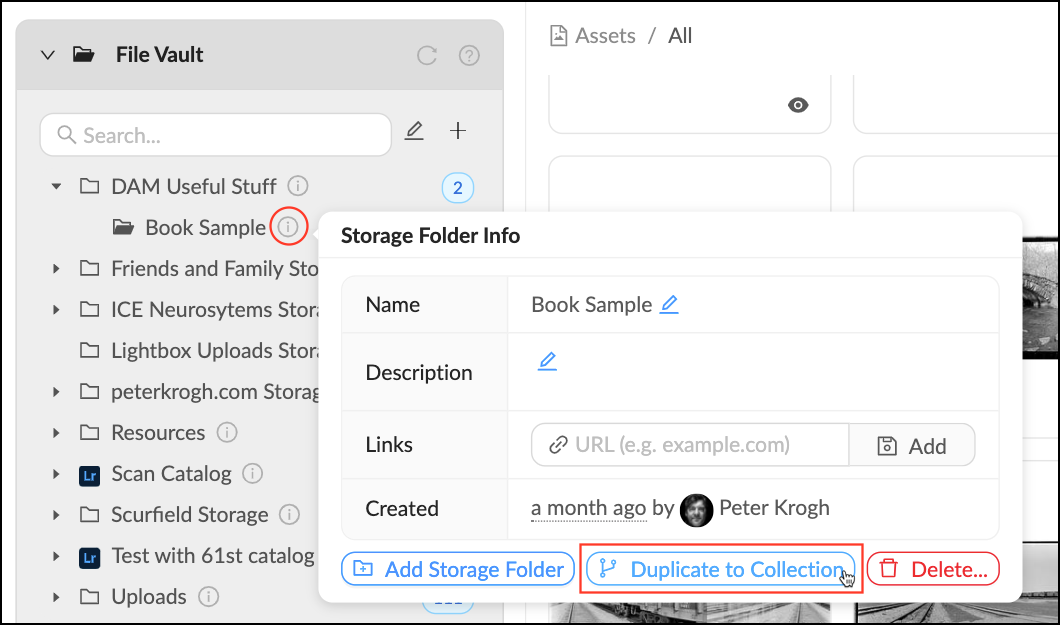
- Locate the Folder you would like to duplicate to a Collection. Mouse over the
 Info pop-over next to the Folder name.
 - Click "Duplicate to Collection".
- Click "OK".
- Refresh Libraries Panel to see your new Collection.
Next Steps
The new Collection will appear as a top-level Collection with no permissions. Collections without any assigned permissions are not visible to any non-staff members. Follow the below links to learn how to apply permissions:
- Quickly apply permissions by moving the Collection into an existing Library Tree.
- Go into the Collection's management panel to apply Group permissions.