
The auto-add feature allows you to automatically add files to a collection from a designated Folder, Collection or Lightbox. This is useful for making files accessible to different groups automatically.
Auto-add for Group Uploads
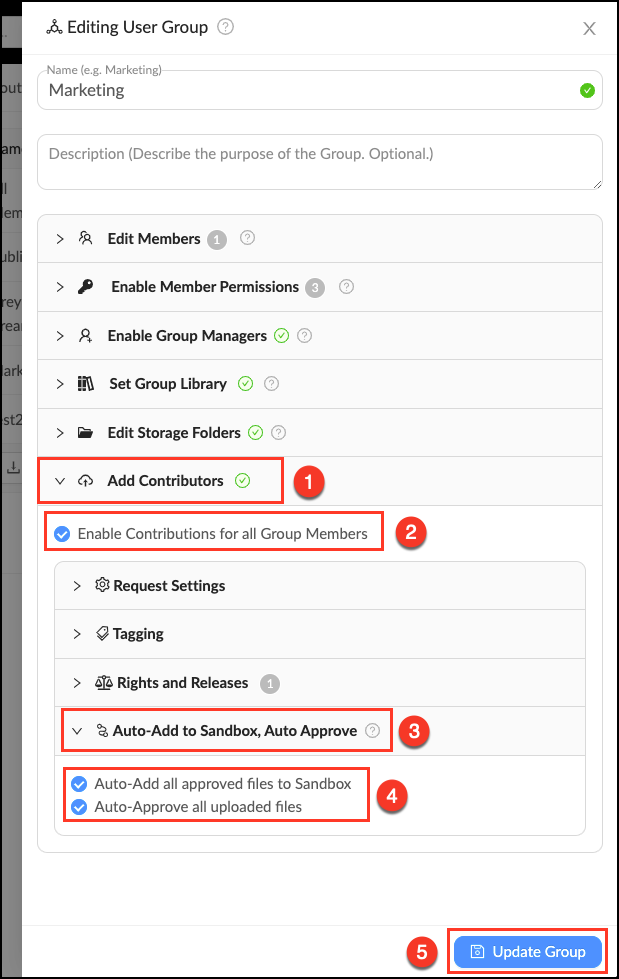
The auto-add feature is found in the Group Contributions settings. It is enabled by default when Group contributions are enabled.
- Go to Manage > Groups and click "Edit" next to the desired Group.
- Open the tab "Add Contributors".
- Check the box to enable contributions from all Group members.
- Click the tab "Sandbox Workflow".
- Check the box to automatically route all Group uploads to the Group Sandbox.
- Click "Update Group" to save changes.
Auto-add in Workflows
Workflows allows you to automatically add files from a designated source container (Folder, Collection or Lightbox) to a designated destination container (Collection or Lightbox). Follow these steps to make a Workflow.
- Click Workflow in the upper left corner to enter the Workflow Tab.
- Click "+ Add New Workflow" in the upper right corner.
- Give your new Workflow a name and description (optional).
- Select the desired source container (Folder, Collection or Lightbox).
- Give Step One a name (optional).
- Select if you would like forwarding to be automatically or manually approved.
- Select the destination container (Collection or Lightbox) you would like files to flow into.
- Click "Save Workflow".
